Shipping Label Generator
Create and print professional 4×6 shipping labels (100×150mm) online for direct thermal printers and courier dispatches. Choose from clean Standard, Compact, and Detailed templates with real-time preview, configure sender and buyer addresses for Prepaid or COD parcels, or generate bulk shipping labels instantly via CSV spreadsheet upload.
Bulk Import Guide
Generate up to 100+ labels simultaneously. Download our structured CSV template, populate your customer shipping records, and drop the completed file below.
Download CSV TemplateClick or Drag & Drop CSV File
Processes instantly in your local browser sandbox
CSV Parse Summary
Parsed Record List
Live Print Preview
4x6 Thermal RollPh:
Ph:
| Order ID: | Weight: | ||
| SKU / Item: | Qty: | ||
| Dimensions: | Mode: | Prepaid |
- Margins → None
- Scale → 100% (Disable "Fit to Page")
Online 4×6 Thermal Shipping Label Generator
For independent sellers, direct-to-consumer businesses, and social commerce entrepreneurs, clean and professional parcel tags are essential for reliable delivery. Hand-written tags often cause misrouted parcels, lost shipments, or return-to-origin (RTO) delays. This free shipping label generator tool enables you to create scannable 4×6 inch (100×150mm) shipping labels calibrated for direct thermal roll printers. You can input individual shipment details or import batches of orders using our CSV template to download multi-page PDF documents.
Three Selectable 4×6 Shipping Label Templates
Different sales channels and courier networks benefit from distinct label formats. Our visual template picker allows you to choose between three layout designs:
- Standard Template: A balanced vertical layout featuring seller branding, split FROM/TO address sections, package details table, prominent Order ID box, and payment banner.
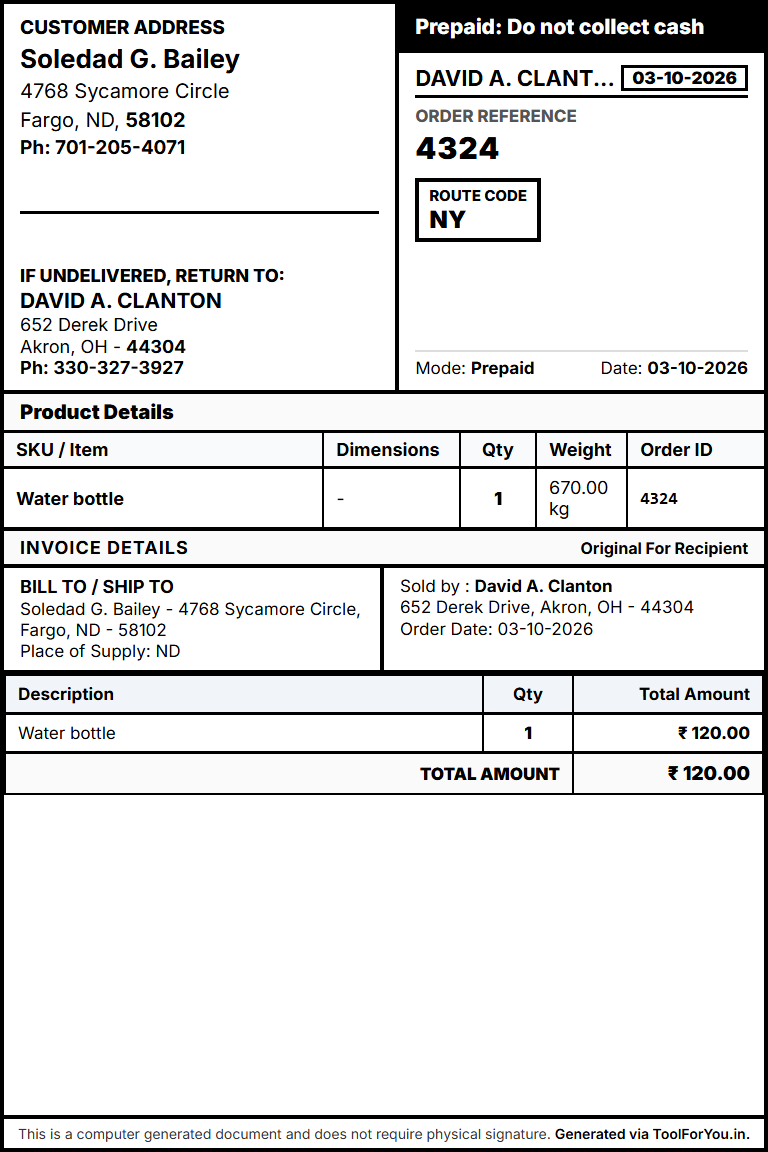
- Compact Template: A structured border-to-border layout featuring customer and return address sections, itemized product details, and invoice summary blocks.
- Detailed Template: A courier-oriented layout with standard routing indicators, complete seller origin address, bold customer destination PIN code, and dispatch details.
You can switch between templates instantly using the visual preview selector, with your entered form data preserved automatically across all designs.
Order Amount Support for Both Prepaid & COD
Whether fulfilling advance paid orders or Cash on Delivery shipments, order values must be presented clearly. The tool allows you to specify product and order amounts for both Prepaid and COD modes. For COD orders, the payment collection amount is prominently highlighted to assist logistics partners and delivery agents during handover.
Bulk Shipping Label Generator with Free PDF Download
When fulfilling high order volumes, manual single-label entry can be time-consuming. Use our bulk mode to generate dozens of shipping labels simultaneously:
- Click the Download CSV Template button to obtain the structured spreadsheet file.
- Fill in your order records including seller details, buyer address, order ID, product name, weight, and order amount.
- Drag and drop the populated CSV into the bulk upload zone to validate all records locally.
- Click Download All Merged PDFs to export all labels compiled into a single print-ready multi-page document.
Thermal Printer Setup Guide (100×150mm / 4×6 Inch)
The label canvas is engineered with an integrated 5px edge-safe margin inside the 4×6 inch boundary to protect borders from physical printer clipping. For optimal print quality on direct thermal printers (such as TSC, Zebra, Xprinter, or TVS):
- Paper Size: Select 4×6 in or 100×150mm in your printer driver properties.
- Margins: Set print dialog margins to None.
- Scale: Set scale to 100% (disable "Fit to Page" to maintain exact dimensions).
- Layout: Ensure orientation is set to Portrait.
100% Client-Side Privacy
Customer shipping addresses and transaction details are sensitive business data. ToolForYou.in processes all label generation, CSV parsing, and PDF exports locally within your web browser. No customer addresses, phone numbers, or order values are uploaded or stored on external servers.